Day: 02 Basics Linux Command..!!
Overview of Linux
Linux® is an open-source operating system (OS). An operating system is a software that directly manages a system’s hardware and resources, like CPU, memory, and storage. The OS sits between applications and hardware and makes the connections between all of your software and the physical resources that do the work.
Directory Structure
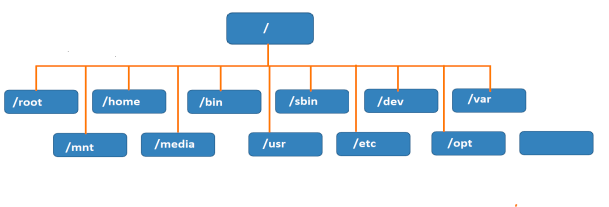
In Linux everything is represented as a file including a hardware program, the files are stored in a directory, and every directory contains a file with a tree structure. That is called File System Hierarchy.
Linux uses a single-rooted, inverted tree-like structure.
Root Directory represents with / (forward slash) It is a top-level directory in RHEL & all Linux.
File System Hierarchy
Basic Linux Commands !!
ls > List all directories/files.
ls -a -> List all files along with hidden files.
ls -la --> command provides a detailed listing of all files and directories in the current directory.
ls -R -> shows all files in a subdirectory.
ls *.sh --> lists all the files having .sh extension.
ls -i --> List the files and directories with index numbers Inodes.
ls -d */ --> List only directories. (we can also specify a pattern).
cd ->for changing the directory.
cat It can be used to create a file, display the content of the file, copy the content of one file to another file, and more.
touch -> for creating empty files.
mkdir -> to make a new directory.
cp -> To copy files.
mv -> to move files around.
rm -> to remove files.
Task for day-02
Check your present working directory.

List all the files or directories including hidden files.

Create a nested directory A/B/C/D/E .

To check memory, will use 3 commands:
RAM
--> free
Disk
--> df -H
CPU
--> top
Thanks for reading this article...
Keep Learning.!!


